
Getting Started
- The Partner (from now on referred to as the Partner side) receives link to the Goldfish documentation
- Partner side implements the set of methods described in the "Ticket API" and "Callbacks API" sections. Implementing all methods listed in these sections is mandatory for launch
- Tickets Travel Network (from now on referred to as the TTN side), after the integration is completed, will send corresponding requests to the Partner side, expecting responses in the format specified in the Goldfish documentation
- The workflow according to which the TTN side will send requests to the Partner side is illustrated in the diagram in the “Workflow” section
- The Partner side checks and validates the correctness of the methods implementation using the Goldfish API Postman Collection
- The Partner side provides access to the test environment and shares it with the TTN side:
BASE_HOST(https://example_test_sandbox.com),PARTNER_ID, andPARTNER_KEY - The TTN side verifies the correctness of the integration implementation using the test credentials; if everything is correct, it requests production credentials from the Partner side
- The Partner side provides the TTN side with production credentials:
BASE_HOST(https://example_live_creds.com),PARTNER_ID, andPARTNER_KEY - The TTN side enables content from the Partner side on live traffic
Workflow
Below is the workflow diagram illustrating the booking process between the TTN and Partner sides.
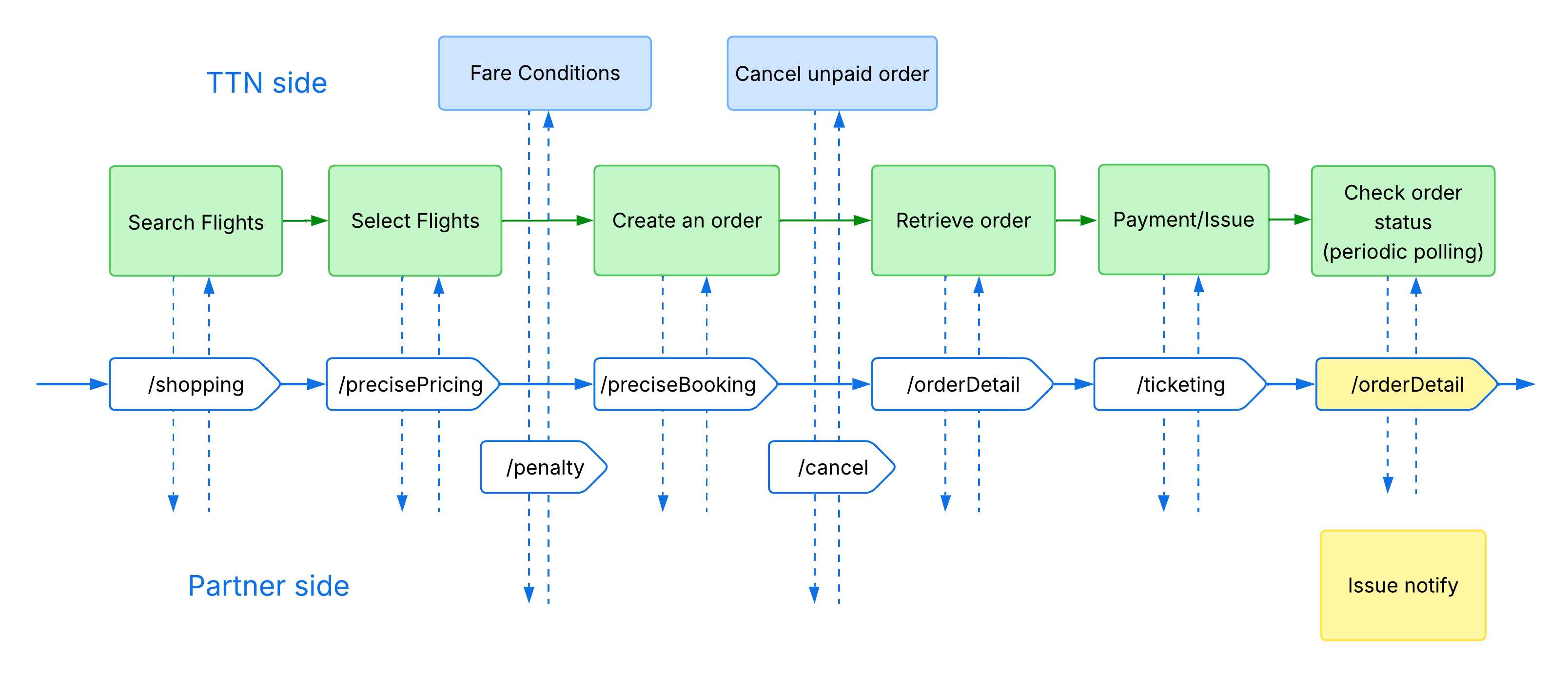
List of methods:
- /shopping - get search result
- /precisePricing - get information by the recommendation
- /penalty - get fare rules
- /preciseBooking - create order request
- /cancel - cancel unpaid order
- /orderDetail - get information by the order
- /ticketing - issue the order
- /Ticket notify callback - order issuance result notification
- /Schedule change callback - notification of changes to the issued order
Inroduction
All API requests must be sent to the specified base host (BASE_HOST).
The BASE_HOST is the Partner's API endpoint (host). It is not provided by TTN and must be supplied and maintained by the Partner.
The Partner must supply their own BASE_HOST (e.g., https://api.partner.com), and all API requests from TTN will be sent to this endpoint.
Each specific API endpoint URL will be appended to the base host to form the complete request URL on the TTN side.
INFO
For example, /json/shopping refers to BASE_HOST + /json/shopping.
All API requests require a SIGN field to verify the identity of the requester.
The PARTNER_ID and PARTNER_KEY are provided by the Partner and used by TTN to generate the SIGN for each request.
To calculate the signature, concatenate PARTNER_ID and PARTNER_KEY into a single string (without any separators) and compute the MD5 hash of the resulting value.
The Partner is responsible for validating the SIGN value on their side using the same logic.
Authentication Parameters Requirements
The PARTNER_ID and PARTNER_KEY are generated on the Partner’s side according to the rules described below. After generation, these values must be shared with the TTN side to enable request validation.
PARTNER_ID Format
- Length: 8 to 64 characters.
- Allowed characters: Alphanumeric (
a-z,A-Z,0-9), hyphens (-), and underscores (_). - Restrictions: Spaces are not allowed.
- Example:
"kL9-2PqX_7"
PARTNER_KEY Format
- Length: 32 to 128 characters.
- Requirements: Must be cryptographically secure and include at least one of each:
- Uppercase letter (
A-Z) - Lowercase letter (
a-z) - Digit (
0-9) - Special character (e.g.,
!@#$%^&*()_+={}[] | :;<>,.?/~)
- Uppercase letter (
- Example:
"kR4jT0_YbA7#xP9@qL2$wM5%vA1^zN8"
TIP
Recommendation: Use reliable random string generators or cryptographic utilities (e.g., openssl rand -base64 32) to create the PARTNER_KEY. The key must be securely stored and used only for validating incoming requests.
SIGN Generation Example (JavaScript)
const PARTNER_ID  = "kL9-2PqX_7"
const PARTNER_KEY = "kR4jT0_YbA7#xP9@qL2$wM5%vA1^zN8"

PARTNER_ID + PARTNER_KEY
// 'kL9-2PqX_7kR4jT0_YbA7#xP9@qL2$wM5%vA1^zN8'

const SIGN = CryptoJS.MD5(PARTNER_ID + PARTNER_KEY).toString()
// 'fddd27c9f2b9de21dce4e840a5c1b182'
The generated SIGN value must be included in the authentication object of every request body.
Request body example:
{
  "authentication": {
    "partnerId": "{{PARTNER_ID}}",
    "sign": "{{SIGN}}"
  },
  "...": "..."
}
Postman Collection
To help you get started quickly and test the API endpoints, we have prepared a ready-to-use Postman collection. You can access and import it using the link below:
Goldfish API Postman Collection
TIP
Configuration Setup:
- Credentials: You can easily set your
PARTNER_ID,PARTNER_KEY, andBASE_HOSTdirectly in the collection's Variables section. - Built-in Validation: The collection includes pre-configured validations. If an endpoint returns an incorrect parameter format or structure, Postman will automatically highlight the error to help you debug quickly.
HTTP Status Codes
When interacting with our API, all responses are returned using only three possible HTTP status codes. They indicate the general result of your request execution:
200 OK— The request was processed successfully. The response body contains the expected data in JSON format.204 No Content— The request was successful, but there is no data to display (this code is used for theshoppingmethod if it does not find and return any available flights based on your specified search criteria).400 Bad Request— Client-side error. Your request contains invalid parameters, missing required fields, or has an incorrect format. Details about the error are usually provided in the response body.
TIP
All textual data in the response must be provided in English. Regardless of the request language, market, or user locale, every field value (names, descriptions, error messages, statuses, etc.) must be returned in English only. Responses containing text in any other language are considered invalid.
Handling Optional Parameters
When returning optional parameters in API responses, if a parameter has no value, you must either:
- Return it as
null(e.g.,"parameter": null) - Exclude the parameter entirely from the response
WARNING
Do not return optional parameters as empty strings (""), empty arrays ([]), or empty objects ({}) unless explicitly required by the endpoint documentation.
Order Status List
| Enum | Description |
|---|---|
| TO_BE_PAID | To be Paid |
| ISS_PRC | Ticket is issuing |
| ISSUED | Ticket issued |
| CNCL | Order Cancelled. Cancelled on the TTN side before the Ticketing request |
| CLOSED | Order closed. Cancelled on the Partner side before the Ticketing request, order expires or other |
| RSV_FAIL | Reservation failed. Cancelled on the Partner side after the Ticketing request |
| REFD | Refunded |
| VOID | Void |
Price Breakdown Explanation
Individual Adult Price = Adult Ticket Fare [adtFare] + Adult Ticket Tax [adtTax] + Ticketing Fee [tktFee]
Individual Child Price = Child Ticket Fare [chdFare] + Child Ticket Tax [chdTax] + Ticketing Fee [tktFee]
Individual Infant Price = Infant Ticket Fare [infFare] + Infant Ticket Tax [infTax] + Ticketing Fee [tktFee]
Total Price = Individual Adult Price * adult passenger number [adults] + Individual Child Price * child passenger number [children] + Individual Infant Price * Infant passenger number [infant]